
How to Retrofit Legacy Machines with IoT Sensors
Add IoT monitoring to older factory machines with clamp-on sensors, an edge gateway and MQTT, without replacing equipment or touching its controls.
By CrimsonEdge Systems team
Most factories run on machines that were built long before anyone talked about IoT. A lathe from the 1990s or a press with a relay panel still does its job well, but it can't tell you when it was idle, how long a changeover took, or that a bearing is starting to wear.
Retrofitting means adding that visibility without replacing the machine or changing how it is controlled. You attach sensors to the outside, connect them to a small edge gateway, and send the data to a dashboard. This guide walks through how to do it.
Why retrofit instead of replace
A new machine with built-in connectivity is a large capital expense. A retrofit typically costs a small fraction of that and can be rolled out machine by machine. It also lets you prove the value of the data on a few machines before deciding where to invest next.
TipPick one bottleneck machine for a pilot. If you can show where its lost hours go, the case for the next ten machines makes itself.
The retrofit architecture
A retrofit system has four layers. Each one can be swapped independently, which keeps you from getting locked into a single vendor.
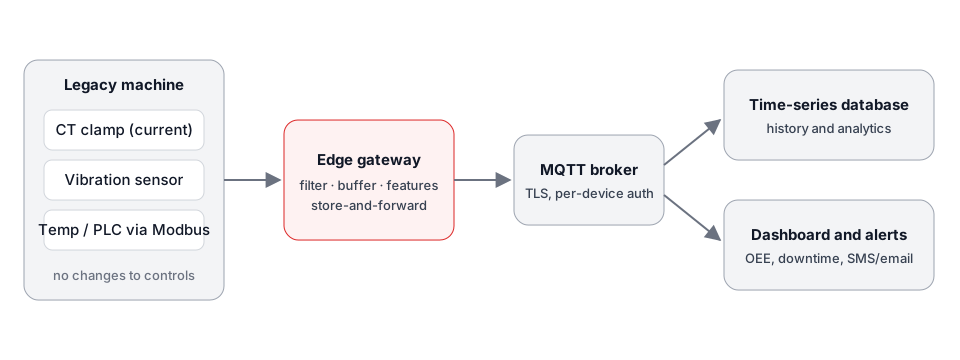
- Sensors read physical signals from the machine.
- An edge gateway collects the readings, cleans them up, and buffers them if the network drops.
- A message broker (usually MQTT) moves data from many gateways to whatever needs it.
- Storage and dashboards turn the data into downtime reports, utilization charts and alerts.
Step 1: Choose sensors that need no access to the controls
The best retrofit sensors are non-invasive. They read what the machine is doing from the outside.
Current clamps for machine state
A split-core current transformer (CT clamp) closes around one conductor of the machine's supply cable. Current draw tells you a lot:
- No current: the machine is off.
- Low, steady current: powered but idle.
- Higher current: the spindle or motor is running.
- Peaks: the machine is cutting or pressing under load.
From this one signal you can calculate utilization, count cycles on many machines, and find unplanned stops.
Vibration sensors for machine health
An accelerometer mounted on a motor or gearbox housing measures vibration. Changes in vibration are one of the earliest signs of bearing wear, imbalance or misalignment. We cover this in detail in Predictive Maintenance with Vibration Sensors and Edge AI.
Temperature, pressure and flow
Thermocouples or RTDs on motors and hydraulic units, and pressure transducers on pneumatic and hydraulic lines, catch overheating and leaks before they cause a stop.
Reading an existing controller
If the machine already has a PLC, CNC controller or energy meter with a serial or Ethernet port, it may expose data over Modbus RTU (RS-485) or Modbus TCP. Reading registers is passive and does not change the program. See MQTT vs OPC UA vs Modbus for how these protocols fit together.
WarningOnly read from a controller. Never write to registers on a production machine unless the change has been tested and approved, and always have a qualified electrician do any work inside an electrical panel.
Step 2: Put intelligence at the edge
The gateway does more than forward data. A good edge layer:
- Samples fast and sends slow. A vibration sensor may sample thousands of times a second; the gateway turns that into a handful of summary values per minute.
- Detects state changes locally, so a stop is reported in seconds rather than when the next batch is uploaded.
- Stores and forwards. If Wi-Fi or the internet drops, readings are buffered and sent later, so there are no gaps in your history.
- Isolates the shop floor. The gateway is the only device that talks to the network, which keeps machines off the office LAN.
For harsh environments, use an industrial-rated gateway in a DIN-rail enclosure with isolated RS-485 inputs rather than a hobbyist development board.
Step 3: Move data with MQTT
MQTT is a lightweight publish/subscribe protocol designed for unreliable networks. Each gateway publishes to topics such as:
factory/plant1/line2/lathe-04/state
factory/plant1/line2/lathe-04/current
factory/plant1/line2/lathe-04/vibration/rms
A structured topic naming scheme like this lets dashboards, databases and alerting tools subscribe to exactly what they need. Turn on TLS and give each gateway its own credentials.
Step 4: Store, visualize and act
Send the data into a time-series database and build dashboards around the questions your team actually asks:
| Question | Signal used |
|---|---|
| How many hours did each machine run this shift? | Current clamp state |
| Where did we lose time this week? | State changes plus operator reason codes |
| Is any motor running hotter than usual? | Temperature trend |
| Which bearings need attention? | Vibration features |
Alerts should go to the people who can act on them: an SMS to the maintenance lead when a critical machine stops unexpectedly is worth more than a dashboard no one opens.
Common mistakes to avoid
- Measuring everything at once. Start with machine state, prove the value, then add health monitoring.
- No operator input. Sensors tell you that a machine stopped, not why. A simple tablet button for reason codes closes that gap.
- Ignoring network coverage. Check Wi-Fi signal at every machine before you install, or plan for wired Ethernet.
- Skipping security. Default passwords and open brokers on a factory network are an easy way in for attackers.
Getting started
A sensible first project is a current clamp on three to five machines, one gateway, and a simple utilization dashboard. It is quick to install, and it produces numbers the whole team understands.
CrimsonEdge Systems designs and builds retrofit IoT systems, from sensor selection to dashboards. See our hardware and IoT integration services or get in touch to talk through your machines.
Frequently asked questions
Can I add IoT monitoring to a machine that has no PLC or network port?
Yes. Clamp-on current sensors, vibration sensors and temperature probes attach to the outside of the machine and read its state without any connection to its controls. They are wired to a small gateway that sends the data to your network.
Do I need to stop production to retrofit a machine?
Usually not for long. A split-core current clamp goes around an existing cable, and magnetic or adhesive vibration sensors attach to the housing. Any work inside an electrical panel should be done by a qualified electrician with the machine isolated.
Should the data go to the cloud or stay on-site?
Either works. Many factories keep a local broker and database so dashboards still work during an internet outage, then forward selected data to the cloud for reporting across sites.
What should a first retrofit project measure?
Start with machine state (off, idle, running) from a current clamp. It answers the most common question, how much of the shift was the machine actually producing, and it is the cheapest sensor to install.
- #industrial-iot
- #retrofit
- #manufacturing
- #mqtt
- #edge-computing